
Download Turbo Art – AI design tool, free, secure, cross‑platform
Intro
Turbo Art is reshaping the way designers, marketers, and hobbyists create visual content. By harnessing the power of generative AI, this web‑based tool turns simple text prompts, sketches, or mood boards into polished graphics in seconds. Because it runs entirely in the browser, there is no bulky installer, no licensing nightmare, and instant access from any modern device—whether you are on Windows, macOS, Linux, Android, or iOS.
The platform delivers a secure environment with end‑to‑end encryption, automatic updates, and a transparent pricing model that includes a generous free tier. Whether you need a quick logo mock‑up, a social‑media illustration, or a high‑resolution print asset, Turbo Art offers a fast, cost‑effective alternative to traditional design suites. In this review we will explore the core capabilities, walk through the onboarding process, examine compatibility, and weigh the strengths against the limitations, so you can decide if this AI‑driven design companion fits your workflow.
Overview & Features
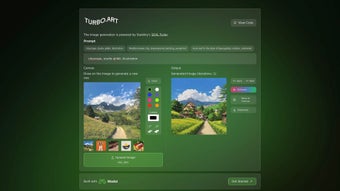
Turbo Art positions itself as a full‑featured AI design application that lives in the cloud. The service debuted in August 2024 and has quickly gathered a community of creators who appreciate its intuitive interface and rapid output. Users start by entering a natural‑language prompt—such as “minimalist tech logo in neon blue”—and the engine produces multiple variations within ten seconds. All rendering happens on secure servers, meaning your local machine stays lightweight and you always benefit from the latest algorithmic improvements without manual updates.
- Prompt‑to‑Image Generation: Convert descriptive text into high‑quality visuals in under 10 seconds.
- Extensive Style Library: Over 500 ready‑made styles, from flat icons to photorealistic scenes.
- Multi‑Format Export: PNG, SVG, PDF, and layered PSD options for downstream editing.
- Real‑time Collaboration: Share a live workspace link for simultaneous team edits.
- Version History & Cloud Storage: Automatic snapshots let you revert to any previous iteration.
- API Access (Pro only): Programmatic generation for custom integrations.
- Secure Cloud Architecture: TLS 1.3 in transit, AES‑256 at rest, GDPR/CCPA compliant.
- Customizable Resolution: Output sizes from 720p up to 8K for print‑ready assets.
- Brand Guard Mode: Enforce company fonts, colors, and logo placement for consistency.
- Community Marketplace: Buy or sell custom style packs created by other users.
Beyond the headline list, Turbo Art includes subtle tools like seed control for reproducible results, a built‑in color palette extractor, and a “brand guard” that limits output to predefined visual guidelines. These capabilities make the platform suitable not only for quick inspiration but also for production‑grade projects where brand consistency and high resolution are essential.
Installation, Compatibility & FAQ
Getting Started – No Installation Required
Turbo Art is delivered as a SaaS solution, so there is nothing to download or install. Follow these steps to begin:
- Visit Turbo.Art and click “Sign Up.” Register with an email address, Google, or Apple ID.
- Verify your email, then choose the free tier (10 generations per day) or upgrade to the Pro plan for unlimited access.
- From the dashboard, select “New Project,” set canvas dimensions, and optionally upload a reference image.
- Enter a prompt, click “Generate,” and review the five AI‑produced variations that appear in seconds.
- Refine the chosen version with sliders for color, detail, and composition, then export in your preferred format.
Cross‑Platform Compatibility
Turbo Art works on any operating system that supports a modern web browser, including Windows 10/11, macOS Ventura, Linux distributions, Chrome OS, iOS Safari, and Android Chrome. It has been tested on the latest releases of Chrome, Edge, Firefox, Safari, Opera, and even Internet Explorer 11 (with limited features). Because the application relies on HTML5, WebGL, and WebAssembly, no additional plugins or drivers are required.
Pros & Cons
- Instant, browser‑based access—no downloads.
- AI‑driven generation speeds up creative workflows.
- High‑resolution exports suitable for both digital and print media.
- End‑to‑end encryption protects user data.
- Generous free tier for casual users.
- Collaboration via shareable links.
- Requires a constant internet connection.
- Free tier limits daily generations.
- Advanced features locked behind Pro subscription.
- Performance can vary with server load.
- Older browsers may lack full rendering capabilities.
Frequently Asked Questions
Is Turbo Art really free to use?
Yes. The free tier offers up to 10 AI‑generated images per day and access to the basic style library. Unlimited generations and premium features require the paid Pro plan.
Can I run Turbo Art on a Mac without installing anything?
Absolutely. As a web‑only service, macOS users only need a modern browser such as Safari, Chrome, or Firefox.
How does Turbo Art protect my designs and personal data?
All traffic uses TLS 1.3, and files are stored encrypted at rest with AES‑256. The platform complies with GDPR and CCPA, and users can delete their data from account settings at any time.
Is there an offline mode for Turbo Art?
Currently no. The AI inference runs on cloud servers, so an internet connection is required. A desktop client is rumored for future release.
Can I integrate Turbo Art into my own workflow via API?
Yes. API access is included with the Pro subscription, allowing programmatic prompt submission and image retrieval.
Turbo Art delivers a compelling mix of AI creativity and practical design tools. Its web‑first approach eliminates installation friction, and the feature set is robust enough for both quick mock‑ups and polished deliverables. The only real downside is the need for a stable internet connection, but this trade‑off is reasonable for a cloud‑native design workflow.
Conclusion & Call to Action
Turbo Art stands out as a secure, fast, and cost‑effective AI design companion that removes many of the repetitive tasks associated with traditional graphic software. Its browser‑only delivery guarantees you always work with the latest algorithms, while the extensive style library, real‑time collaboration, and high‑resolution export options make it suitable for freelancers, agencies, and in‑house teams alike. The free tier lowers the entry barrier, and the Pro plan provides a clear upgrade path for power users who need unlimited generations and API integration. If you are looking for a modern tool that blends AI creativity with professional‑grade output, Turbo Art is definitely worth a try.
Ready to boost your design workflow? Download Turbo Art now, start your first project, and experience how quickly AI can turn ideas into polished visuals. Share your feedback on Softonic to help shape future updates and keep the community thriving.



.png)



